Artificial‑intelligence (AI) transcription has evolved dramatically over the last decade. From niche apps that struggled with basic commands to sophisticated platforms that can transcribe podcasts, meetings and lectures, the promise of “speak and it becomes text” is closer than ever. But as we step into 2025, a pressing question remains: is AI audio‑to‑text accurate enough for everyday use?
The answer is nuanced. In ideal situations—clear audio, a single speaker and familiar vocabulary—top AI transcription services can reach 85 %–99 % accuracy. Yet real life is messy. Background noise, accents and multiple speakers all reduce performance, leading to error rates that can affect usability. To decide whether AI transcription suits your needs, we need to explore how it works, what influences accuracy and what tools are available.
How Does AI Transcription Work?
Modern transcription systems rely on deep neural networks trained on vast datasets of human speech. These models convert sound waves into text by recognizing patterns and predicting likely word sequences. Leading platforms like OpenAI’s Whisper, Google Cloud Speech‑to‑Text and Deepgram are trained on thousands of hours of audio across many languages, enabling them to handle a wide range of accents and topics. However, they still perform best when the input resembles the training data, meaning clear, close‑microphone recordings.
Factors Affecting Accuracy
Several variables determine how well AI will transcribe your audio:
- Audio clarity: High‑quality recordings with minimal background noise yield the best results. Echoes, chatter or mechanical noise can cause word substitutions and omissions.
- Number of speakers: Most AI systems excel with a single speaker. When multiple voices overlap, models struggle to assign the right words to each person.
- Accents and dialects: While multilingual support is improving, performance can drop for underrepresented accents or non‑standard dialects.
- Domain‑specific terminology: Generic models may misinterpret jargon. Custom vocabulary lists or specialized models help here.
- Speech patterns: Slow, clear speech improves accuracy. Rapid-fire conversation, mumbling or interruptions hinder transcription.
Understanding these factors helps set expectations. In optimal conditions, AI can approach human‑level accuracy; in challenging environments, results may need manual correction.
What Does “Accurate Enough” Mean?
Accuracy is often measured by Word Error Rate (WER)—the percentage of words that differ from a human transcript. In controlled tests, premium services often cross the 90 % accuracy threshold. But in noisy or multi‑speaker scenarios, accuracy may drop by 30–40 %.
What constitutes “good enough” depends on your use case:
- Brainstorming and personal notes: A higher WER (10–20 %) is acceptable when you just need a rough draft to capture ideas.
- Professional communications: For meeting minutes and client communications, aim for a WER under 10 %. You may need to proofread AI output.
- Critical domains: In legal, medical or academic contexts, you should target WER below 5 %. Hybrid AI‑plus‑human services can help achieve this level of accuracy.
A Spotlight on SoundWise.ai
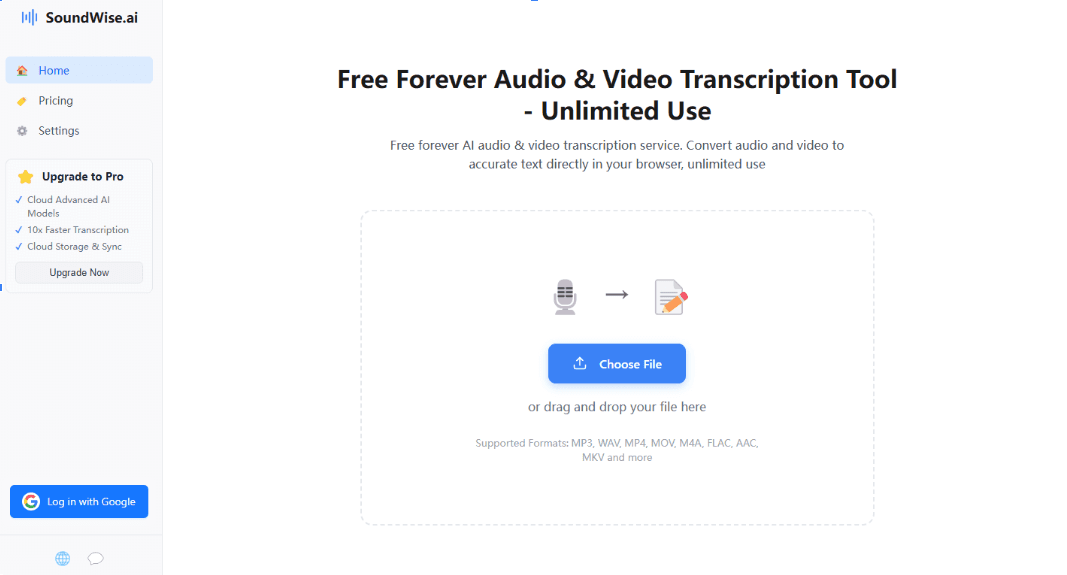
Given the variability in AI transcription performance, choosing a tool that balances convenience with reliability is essential. SoundWise.ai is one platform that aims to bridge that gap for everyday users and professionals alike. Unlike some transcription services that focus solely on enterprise clients, SoundWise emphasizes ease of use without sacrificing accuracy. Here’s what sets it apart:
- User‑friendly upload and interface: You can quickly upload common audio formats such as MP3, WAV and M4A through a clean web interface. There’s no need for special software or complicated settings.
- AI‑powered accuracy with context awareness: SoundWise leverages state‑of‑the‑art models trained on diverse datasets to recognize different accents and speaking styles. It supports speaker identification, helping differentiate between multiple participants in meetings.
- Scalable for study and work: Whether you’re a student converting lectures into notes, a professional transcribing meetings or a creator turning interviews into articles, SoundWise adapts to different lengths and file sizes.
- Affordable entry point: The platform offers free and paid tiers so you can experiment before committing. For example, the audio to text transcription feature lets you try converting your recordings with no risk, while more advanced plans add longer files and extra features. Similarly, the mp3 to text free option is perfect for quickly turning an MP3 into a readable transcript without pulling out your wallet.
Integrating SoundWise into this discussion is important because it illustrates how modern tools are addressing the very concerns raised in this article. By providing accessible AI transcription with a friendly interface, SoundWise aims to make speech‑to‑text technology practical for everyday use—even if you’re not a tech expert. The availability of free options means you can test the service on your own audio clips and judge the accuracy yourself. And if you like the results, there’s room to scale up.
Is AI Keeping Up in 2025?
The transcription landscape is rapidly evolving. Predictions suggest that by the end of 2025, AI platforms could achieve around 85 % accuracy when interpreting idiomatic expressions and emotional context. New models are being trained on larger, more diverse datasets, and techniques such as multimodal fusion (combining audio with visual cues) promise further improvements. At the same time, researchers are striving to reduce biases that affect underrepresented accents and dialects.
Still, it’s important to be realistic. Even the best AI models occasionally misinterpret homophones or invent words, especially in noisy environments. Recent reports have highlighted cases where AI transcripts contain hallucinated phrases, underscoring the need for human oversight in critical scenarios. As AI adoption grows, ethical considerations about privacy and bias will also remain central.
Tips for Maximizing AI Transcription Success
To get the most out of AI transcription tools—whether SoundWise or another service—consider these best practices:
- Record in a quiet environment: Reduce background noise to improve accuracy.
- Use quality microphones: External microphones or headsets generally outperform built‑in laptop mics.
- Speak clearly and pause between ideas: This helps the AI segment speech correctly.
- Segment long recordings: Breaking long audio into shorter clips can help the model process more accurately.
- Upload custom vocabulary: If your field uses specialized terms, many platforms allow you to create custom dictionaries to improve recognition.
- Review and edit: Always proofread the AI‑generated transcript, especially for names and numbers.
Conclusion: Is AI Audio‑to‑Text Ready for You?
AI audio‑to‑text technology in 2025 is surprisingly capable for many everyday applications. Under optimal conditions, leading systems deliver high accuracy—often over 90 %—and new models are continually improving. For non‑critical tasks like note‑taking, brainstorming or creating rough drafts, AI transcription can save hours. Even in professional settings, AI is becoming reliable enough to form the backbone of meeting notes and content creation workflows.
However, limitations remain. Accuracy drops in noisy settings, with multiple speakers or when dealing with specialized vocabulary. Bias across accents and dialects is an ongoing concern. That’s why choosing the right tool and adopting best practices matter. Platforms like SoundWise.ai offer a practical balance: easy uploads, competitive accuracy, free entry points and features that cater to students, professionals and creators alike. By testing services such as their audio to text transcription or mp3 to text free tools, you can assess whether AI transcription meets your needs and where human oversight may still be required.
Ultimately, AI audio‑to‑text in 2025 is not a one‑size‑fits‑all solution—but it’s closer than ever. With thoughtful use and the right tools, you can harness its power to save time, capture ideas and boost productivity.