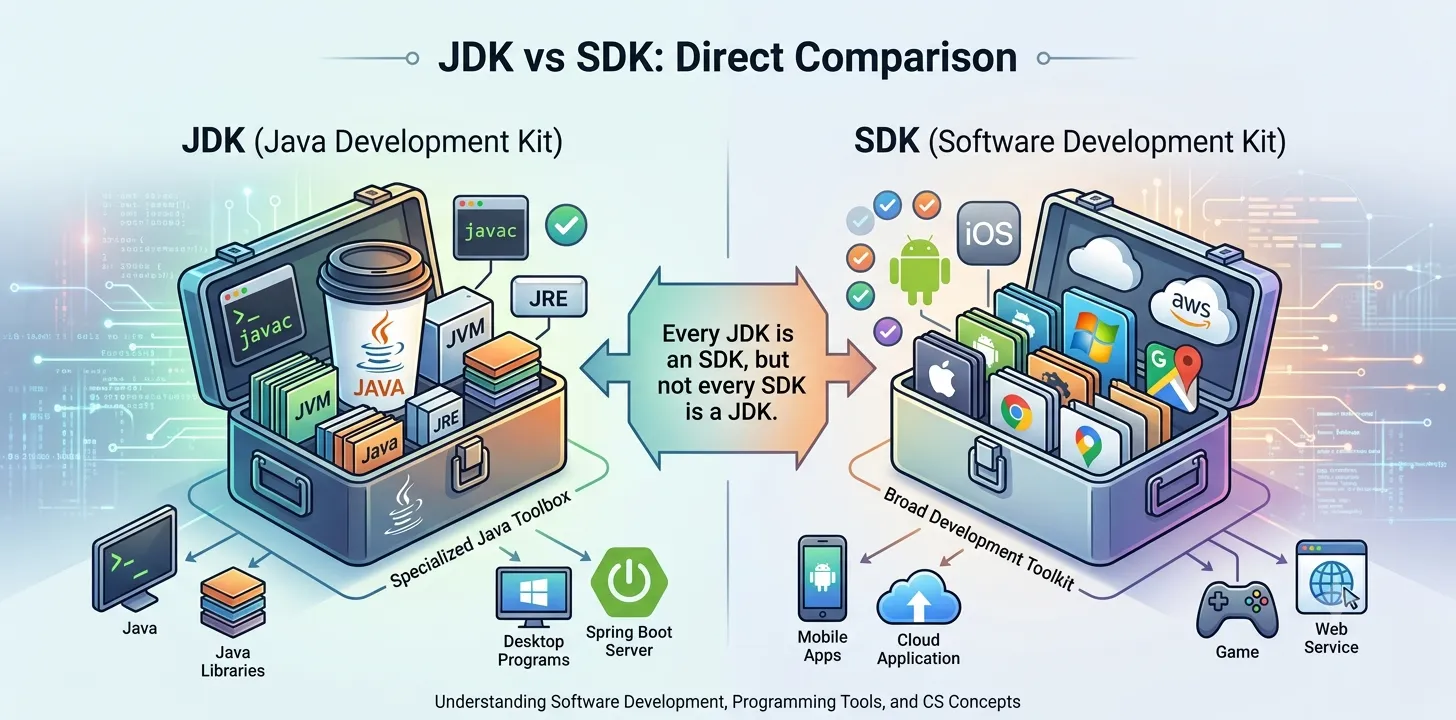
JDK (Java Development Kit) and SDK (Software Development Kit) are both collections of tools used for software development, but they are not the same thing.
A JDK is a specialized SDK designed specifically for Java development. It includes everything needed to write, compile, debug, and run Java applications, such as the Java compiler (javac), the Java Runtime Environment (JRE), debugging tools, documentation, and standard Java libraries.
An SDK, on the other hand, is a broader concept. It refers to a complete toolkit provided for building applications for a specific platform, operating system, framework, programming language, or service. For example, there are SDKs for Android, iOS, Windows, AWS, Google Maps, and many other platforms. An SDK may include APIs, libraries, documentation, emulators, sample code, debugging tools, and platform-specific utilities.
The easiest way to remember the difference is:
Every JDK is an SDK, but not every SDK is a JDK.
Think of an SDK as a toolbox, while the JDK is a Java-specific toolbox.
| Feature | JDK | SDK |
|---|
| Full Form | Java Development Kit | Software Development Kit |
| Purpose | Develop Java applications | Develop applications for a specific platform or technology |
| Scope | Java only | Any programming platform or framework |
| Includes Compiler | ✅ Yes | Depends on the SDK |
| Includes Runtime | ✅ Yes (JRE) | Sometimes |
| Programming Language | Java | Can support Java, Kotlin, Swift, C#, Python, JavaScript, C++, and others |
| Examples | Oracle JDK, OpenJDK | Android SDK, Windows SDK, iOS SDK, AWS SDK, Flutter SDK |
| Relationship | A specialized SDK | General category of development kits |
What Is a JDK?
A Java Development Kit (JDK) is the official toolkit used to develop Java applications. It contains everything required to write, compile, debug, package, and run Java programs.
A typical JDK includes:
-
Java compiler (javac)
-
Java Runtime Environment (JRE)
-
Java Virtual Machine (JVM)
-
Standard Java libraries
-
Debugging tools
-
Documentation
-
Command-line development utilities
Without a JDK, developers cannot compile Java source code into executable Java bytecode.
What Is an SDK?
A Software Development Kit (SDK) is a collection of tools, libraries, APIs, documentation, sample code, and utilities that help developers build software for a particular platform or technology.
Depending on its purpose, an SDK may include:
-
APIs
-
Libraries
-
Build tools
-
Debuggers
-
Emulators or simulators
-
Documentation
-
Sample projects
-
Testing tools
For example, the Android SDK provides everything needed to build Android applications, including build tools, platform libraries, and device emulators.
Components
Understanding what each toolkit contains makes the difference much clearer.
| JDK Components | SDK Components |
|---|
Java Compiler (javac) | APIs |
| Java Runtime Environment (JRE) | Libraries |
| Java Virtual Machine (JVM) | Documentation |
| Java Standard Libraries | Sample Code |
| Debugging Tools | Build Tools |
| Packaging Utilities | Debuggers |
| Development Utilities | Emulators/Simulators (when applicable) |
One important distinction is that SDKs vary depending on the platform, whereas the JDK always focuses on Java development.
Common Use Cases
Both are used by software developers, but in different situations.
JDK
Used for:
-
Java desktop applications
-
Enterprise Java applications
-
Spring Boot development
-
Java backend development
-
Java command-line programs
-
Learning Java programming
SDK
Used for:
-
Android app development
-
iOS application development
-
Cloud application development (AWS, Azure, Google Cloud)
-
Game development
-
Web APIs
-
AI and machine learning platforms
-
Payment gateway integrations
-
Maps and location services
In practice, developers often use multiple SDKs together. For example, an Android developer typically installs both the JDK and the Android SDK because Android development requires Java (or Kotlin) tools as well as Android-specific tools.
Advantages
JDK
Advantages
-
Complete toolkit for Java development.
-
Official support for compiling and running Java applications.
-
Includes essential development and debugging tools.
-
Cross-platform compatibility through the JVM.
-
Large ecosystem and community support.
SDK
Advantages
-
Speeds up application development.
-
Provides platform-specific tools and libraries.
-
Includes documentation and sample code.
-
Simplifies integration with operating systems and services.
-
Reduces development time by offering ready-made components.
One reason SDKs are so valuable is that developers don't need to build every feature from scratch. Instead, they can use well-tested libraries and tools supplied by the platform owner, improving both productivity and consistency.
Common Misconceptions
"JDK and SDK are the same."
No.
A JDK is a specific type of SDK created exclusively for Java development.
"Every SDK contains a compiler."
Not necessarily.
Some SDKs include compilers, while others provide only libraries, APIs, documentation, and development tools. It depends on the platform.
"You only need the JDK to build Android apps."
Incorrect.
Modern Android development requires the Android SDK in addition to a compatible JDK because Android apps rely on Android-specific APIs, build tools, and platform libraries.
"SDK means Java."
No.
SDK is a general software engineering term. There are SDKs for countless technologies beyond Java, including cloud platforms, mobile operating systems, AI services, payment gateways, and game engines.
Frequently Asked Questions (FAQs)
1. What is the main difference between JDK and SDK?
A JDK is a Java-specific development kit, while an SDK is a general toolkit for building software for a particular platform or technology. Every JDK is an SDK, but not every SDK is a JDK.
2. Is JDK an SDK?
Yes.
The Java Development Kit is a specialized Software Development Kit designed specifically for Java development.
3. Do Android developers need both JDK and SDK?
Yes.
Android development typically requires a compatible JDK along with the Android SDK, which provides Android-specific APIs, build tools, and emulators.
4. Can an SDK be used without Java?
Absolutely.
Many SDKs support languages other than Java, including Swift, Kotlin, C#, Python, JavaScript, C++, and more.
5. Which should beginners learn first?
If your goal is Java development, start with the JDK. If you're targeting a specific platform, such as Android, iOS, or cloud services, you'll also need the relevant SDK for that platform.
The difference between JDK and SDK is primarily about specialization versus generalization. An SDK is a broad collection of development tools designed for a specific platform, framework, or service, whereas the JDK is the Java ecosystem's dedicated SDK, containing everything required to develop, compile, debug, and run Java applications. Understanding this distinction is important because modern software development rarely relies on a single toolkit. A Java developer primarily uses the JDK, while an Android developer, for example, works with both the JDK and the Android SDK. Recognizing how these toolkits complement each other helps developers choose the right environment, streamline development, and build applications more efficiently.
Must Read: What are the different levels of software testing?


.jpeg&w=640&q=75)