
A TV remote works by sending a wireless signal to your television whenever you press a button. In most TVs, this signal is sent using infrared (IR) light, which is invisible to the human eye. Newer smart TVs may use Bluetooth or radio frequency (RF) instead, allowing the remote to work even when it isn't pointed directly at the TV. Once the television receives the signal, it decodes the command and performs the requested action, such as changing the channel or adjusting the volume.
It almost feels like magic the first time you think about it. You press a tiny button from across the room, and the TV instantly responds. In reality, it's a clever combination of electronics, invisible light, and digital communication that happens in just a fraction of a second.
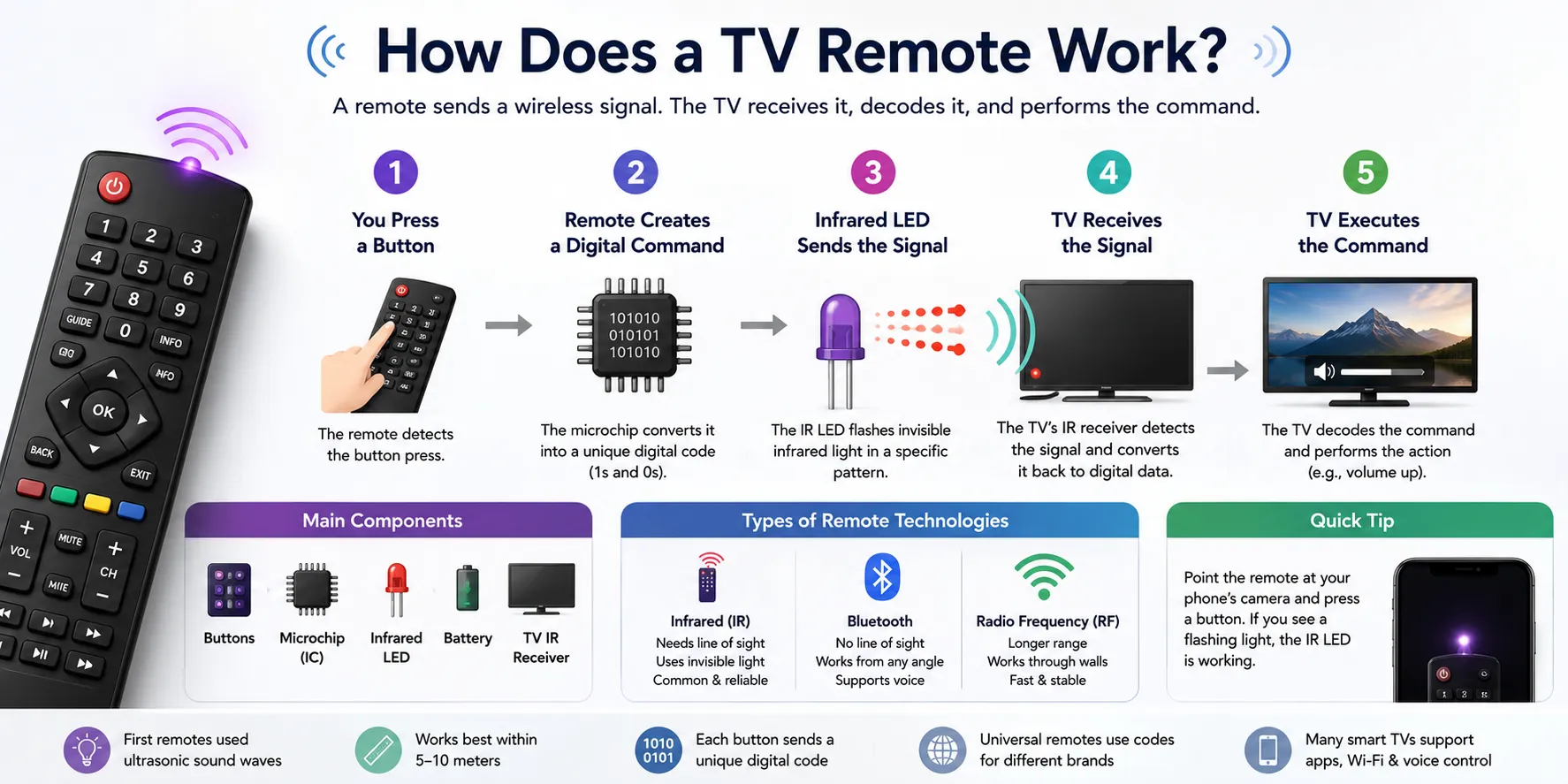
Step-by-Step Working Process
Although the process happens almost instantly, several things take place behind the scenes.
Step 1: You Press a Button
Every button on the remote is connected to a small electronic circuit.
When you press Power, Volume Up, or Channel Down, the remote identifies which button was pressed.
Step 2: The Remote Creates a Digital Command
Inside the remote is a tiny microchip.
Instead of sending words like "Volume Up," it converts your button press into a unique digital code made of 1s and 0s (binary data).
Every button has its own code.
For example:
- Power
- Volume Up
- Volume Down
- Mute
- Channel Up
all have different digital signals.
Step 3: The Infrared LED Sends the Signal
At the front of the remote is a small infrared LED.
It flashes infrared light in a very specific pattern.
You can't see this light because infrared is outside the visible spectrum, but your TV's sensor can.
In most remotes, the light flashes at around 38 kHz, helping the TV distinguish the remote's signal from sunlight or room lighting.
Step 4: The TV Receives the Signal
The television has an infrared receiver on its front panel.
When it detects the flashing pattern, it converts the light back into digital data.
The TV's processor reads the command and understands exactly what you requested.
Step 5: The TV Executes the Command
Finally, the TV performs the action.
For example:
- Increase volume
- Turn on
- Open Settings
- Change HDMI input
- Launch a streaming app
The entire process usually takes only a few milliseconds.
Main Components of a TV Remote
Even though a remote looks simple from the outside, several important components work together.
| Component | Purpose |
|---|---|
| Buttons | Detect which command you press |
| Microchip (IC) | Converts button presses into digital codes |
| Infrared LED | Sends invisible infrared signals |
| Battery | Powers the remote |
| TV IR Receiver | Receives and decodes the signal |
Each part plays an important role. If even one component stops working, the remote may stop communicating with the TV.
Types of TV Remote Technologies
Not every remote uses the same communication method.
1. Infrared (IR)
This is the most common technology.
Characteristics:
- Requires pointing at the TV.
- Uses invisible infrared light.
- Affordable and reliable.
- Works within a limited range.
2. Bluetooth
Many smart TVs now include Bluetooth remotes.
Advantages:
- Doesn't require direct line of sight.
- Works from different angles.
- Supports voice assistants.
3. Radio Frequency (RF)
Some premium TVs and media devices use RF remotes.
Benefits include:
- Longer operating range.
- Can work through furniture or walls.
- Faster communication in some setups.
Modern streaming devices often combine Bluetooth and RF technologies for greater convenience.
Common Problems
If your TV remote suddenly stops working, the issue is often surprisingly simple.
Some common causes include:
- Dead batteries.
- Objects blocking the infrared signal.
- Dirty battery contacts.
- Damaged buttons.
- A faulty infrared LED.
- The TV's IR sensor being covered.
Here's a quick test that many people don't know about.
Open your phone's camera and point it toward the front of the remote.
Press any button.
If you see a flashing white or purple light on your phone screen, the infrared LED is probably working. Since smartphone cameras can detect infrared light, they reveal something your eyes can't see.
Interesting Facts
A few things about TV remotes surprise most people.
- Early television remotes didn't use infrared light. Some of the first models relied on ultrasonic sound waves.
- Most infrared remotes work best within about 5–10 meters (16–33 feet), provided there's a clear line of sight.
- Every button sends a unique digital code rather than a simple "on" or "off" signal.
- Universal remotes work because they're programmed to transmit the command codes used by different TV brands.
- Many smart TVs today support control through Bluetooth, Wi-Fi, voice assistants, or smartphone apps, reducing the need for traditional infrared communication.
TV Remote Working at a Glance
| Feature | Details |
|---|---|
| Main Technology | Infrared (IR), Bluetooth, or RF |
| Signal Type | Digital codes transmitted wirelessly |
| Power Source | Batteries |
| Receiver Location | Front of the TV |
| Average Response Time | A few milliseconds |
A TV remote may look like a simple handheld device, but it combines electronics, wireless communication, and digital encoding to perform hundreds of commands almost instantly. Whether it uses infrared, Bluetooth, or radio frequency, the basic idea remains the same: convert your button press into a digital signal, send it wirelessly, and let the TV interpret and execute the command. Understanding this process also makes it much easier to troubleshoot common remote-control problems when they occur.
Frequently Asked Questions (FAQs)
1. Does every TV remote use infrared?
No. While most traditional TV remotes use infrared (IR), many modern smart TVs use Bluetooth or RF technology.
2. Why do I have to point my remote at the TV?
Infrared light travels in straight lines, so the remote usually needs a clear line of sight to the TV's IR receiver.
3. How can I tell if my TV remote is working?
Point the front of the remote at your smartphone's camera and press a button. If you see a flashing light on the screen, the IR LED is likely working.
4. Why does my smart TV remote work without pointing at the TV?
Many smart TV remotes use Bluetooth, which doesn't require direct line of sight.
5. Can one remote control multiple devices?
Yes. Universal remotes can be programmed to control televisions, soundbars, DVD players, streaming devices, and other compatible electronics by sending the correct command codes.
Must Read: What is the difference between Bluetooth and Wi-Fi devices?
