R
Rajesh Yadav· 10 days ago
Author

What is ParentSquare and how to manage notifications?

7
56

Join this conversation

Sort By
Replying to the question above
Answered on11/12/26

In today's digital world, schools are using different online platforms to communicate with parents, students, and teachers. One such platform is ParentSquare, which helps schools share important announcements, attendance updates, event information, and other educational notices with families.

However, sometimes users receive too many notifications from ParentSquare, which can become distracting. In such situations, knowing how to manage notification settings becomes important.

In my opinion, ParentSquare is a useful platform because it brings school-related communication into one place. You can also customize how and when you receive notifications through email, text messages, and mobile app alerts.

Let's understand what ParentSquare is, how it works, and how you can manage its notifications.

1. What is ParentSquare?
Article image

ParentSquare is a school-to-home communication platform that helps teachers, school administrators, parents, and students stay connected.

Schools use this platform to share important information and communicate with families through different channels, including email, SMS, mobile app notifications, and voice messages.

Some of its main features include:

  • School Announcements: Receive updates about school activities, events, and important information.

  • Direct Messaging: Communicate with teachers and school staff.

  • Attendance Updates: Receive information about student attendance.

  • Emergency Alerts: Get urgent notifications about school closures and important safety updates.

  • Event Information: Stay informed about meetings, school programs, and upcoming activities.

  • Language Support: Access communication in different languages through translation features.

The main purpose of ParentSquare is to make communication between schools and families easier and more organized.

2. How Does ParentSquare Work?

ParentSquare works as a centralized communication system for schools and families.

Once a school connects its student information system with ParentSquare, parents and guardians can receive school-related updates using their registered email address or phone number.

Here's how it generally works:

  1. The school creates or activates a ParentSquare account for families.

  2. Parents register using their registered email address or mobile number.

  3. Teachers and school administrators share announcements and updates.

  4. Parents receive notifications through their preferred communication channels.

  5. Users can respond to messages and stay connected with the school.

3. How to Manage Notifications in ParentSquare?

If you receive too many notifications from ParentSquare, you can customize your notification preferences. The platform generally provides three options: Instant, Digest, and Off.

Let's understand these options.

Notification Setting

Meaning

Instant

Receive notifications as soon as a message or post is sent.

Digest

Receive a daily summary of posts, usually in the evening.

Off

Stop regular post notifications through that selected channel.

One important thing to remember is that urgent emergency alerts and critical notices may still be delivered even when regular notifications are turned off.

4. How to Change ParentSquare Notification Settings on Mobile?

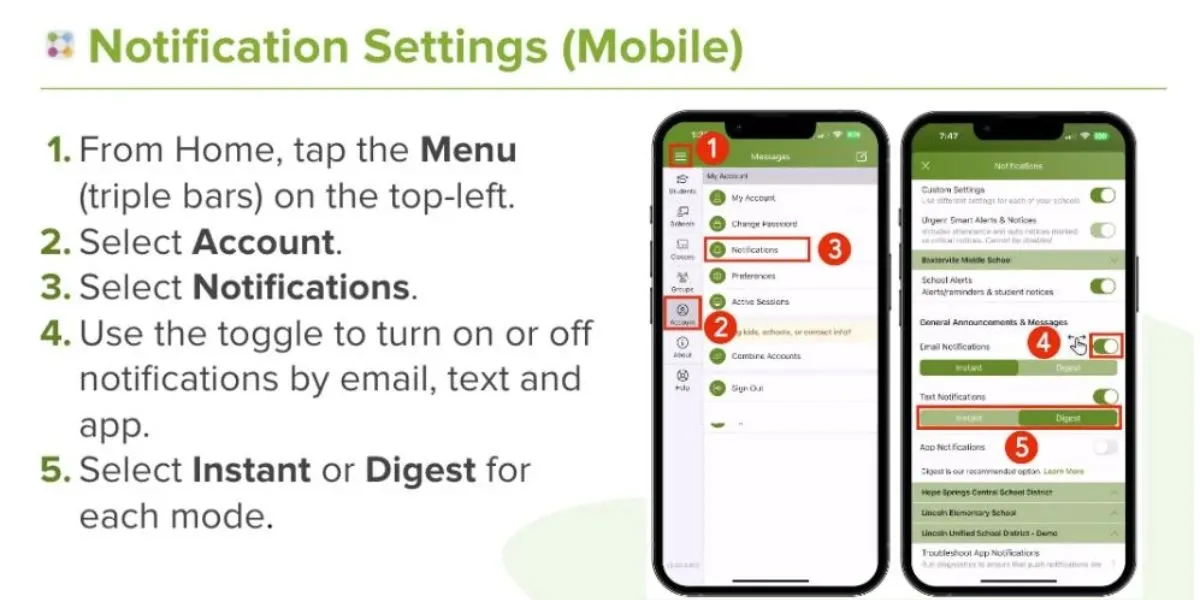
If you use the ParentSquare mobile app, follow these simple steps to manage your notifications:

  1. Open the ParentSquare app on your smartphone.

  2. Tap the Menu icon (☰) in the top-left corner.

  3. Select the Account option.

  4. Tap on Notifications.

  5. Choose how you want to receive notifications.

  6. Turn Email, Text, or App notifications on or off.

  7. Select Instant or Digest according to your preference.

You can also customize notification preferences for different schools if your account is connected to multiple schools.
Article image

5. How to Manage ParentSquare Notifications on a Computer?

If you prefer using ParentSquare on a laptop or desktop, you can change your notification settings through its website.

Follow these steps:

  1. Open the ParentSquare website.

  2. Log in to your account.

  3. Click on your name in the top-right corner.

  4. Select My Account or Manage Account.

  5. Open Notification Settings.

  6. Choose your preferred notification options for Email, Text, and App.

  7. Select Instant, Digest, or Off wherever available.

Your preferences will generally be saved automatically and applied to future notifications.

6. How to Stop Receiving Too Many ParentSquare Notifications?

Sometimes, receiving multiple school announcements and reminders throughout the day can be overwhelming.

Here are some simple ways to manage them:

  1. Choose Digest Notifications: Instead of receiving every regular announcement separately, select Digest to receive a daily summary.

  2. Customize Email Alerts: Choose whether you want school updates through email.

  3. Manage App Notifications: Turn off unnecessary app notifications through your account settings.

  4. Check Text Preferences: Select your preferred method for receiving regular school messages.

  5. Keep Important Alerts Enabled: Avoid disabling important school and emergency alerts.

If you want fewer notifications without missing important updates, Digest is generally a useful option.

7. What Are the Different Types of ParentSquare Notifications?

ParentSquare notifications can be divided into different categories depending on the type of information being shared.

Notification Type

Purpose

General Announcements

School news, updates, and regular posts

Direct Messages

Personal communication with teachers or school staff

School Alerts

Important student-related notices

Emergency Alerts

Urgent information and critical announcements

Understanding these categories helps you manage your preferences more effectively.

Remember that some urgent notifications cannot be disabled through regular notification settings.

Conclusion

ParentSquare is a useful communication platform that helps schools, teachers, parents, and students stay connected. It makes it easier to receive school announcements, attendance information, event updates, and important notices in one place.

If you receive too many notifications, you don't need to stop using the platform. Simply visit your Notification Settings and choose Instant, Digest, or Off according to your preferences.

I would recommend using Digest for regular announcements while keeping important school alerts enabled. This way, you can reduce unnecessary notifications without missing important school-related information.

Useful Official Resources:

A
View Profile

Aanya Sharma is a science and technology writer with over 5 years of experience and 300+ published articles across leading digital platforms. She holds a Bachelor's degree in Science (Physics) from Delhi University, which grounds her writing in scientific literacy and gives her the ability to evaluate technical claims with accuracy. Her work has appeared on platforms including The Wire Science, Analytics India Magazine, and Digit.in, where she has covered artificial intelligence, space exploration, consumer technology, environmental science, and emerging tech policy. With a focus on accuracy and clarity, her writing makes complex scientific and technological developments accessible to readers without a technical background. Aanya has participated in science communication panels at events including the India Science Festival and has been recognised as a contributor to responsible tech journalism in India. She is an active member of the National Association of Science Writers (NASW) and maintains a public portfolio of her published work. Across all her work, her writing is grounded in verified sources and a commitment to editorial standards — delivering content that readers can rely on in a space where misinformation spreads easily.

0
Replying to the question above
Updated on11/05/26

Quick answer: ParentSquare is a free communication platform that schools use to send announcements, messages, alerts and sign-up requests to families. You manage notifications in your account's Notification Settings by choosing how you are contacted (text, email or app) and how often (Off, Instant or Digest). Urgent alerts cannot be switched off.

What ParentSquare does

ParentSquare puts school news, classroom updates, attendance notices and direct messages in one place. Families can message teachers and staff, join group conversations, view photos and posts and, where the school has enabled them, pay fees or respond to absences. Sign-ups for conferences, volunteering and classroom wish lists also live there.

Translation

Parents can set a language preference, and messages are translated into it automatically, including messages sent to staff. The iOS listing mentions more than 190 languages, which makes the platform useful for multilingual communities.

Getting started

Schools usually create accounts from the contact details they already hold. Download the app or visit the website, register using the email address or phone number linked to your child's record and set a password. If your details are not recognised, ask the school office to update them. Even without activating an account, many parents receive a daily email digest.

Where to find the settings

  • On the web: click your name, choose My Account, then Notification Settings.

  • In the app: open the menu, tap Account, then Notifications.

Districts customise some features, so menu names may differ.

The three kinds of notification

  • Urgent alerts and notices. These cover emergencies, attendance and critical messages, and they cannot be disabled.

  • General announcements and messages. Posts, direct messages and reminders.

  • School alerts. Smart alerts and other student notices, which you can turn on or off.

Choosing how often to hear from school

  • Instant: you receive a notification every time a post or message is sent.

  • Digest: you receive one summary each evening, while direct messages, alerts and time-sensitive posts still arrive immediately.

  • Off: you receive no post notifications, although urgent alerts and notices still reach you.

Picking your delivery method

You can choose text, email, an app notification or any combination. App alerts also need to be switched on in your phone's own settings. If you have several emails or phone numbers, you can set their order of preference.

Handling several schools

In the mobile app, turn Custom Settings off to use the same preferences everywhere, or on to set a different pattern for each school. That helps families with children in different buildings.

A sensible setup for busy families

Choose Digest, keep School Alerts on, and allow app notifications on one device. This keeps the day quiet, yet important information still arrives.

Sources:

Joe Rose
Author
View Profile

Joe Rose is a Systems Architect and science and technology writer with over 11 years of hands-on experience designing and building large-scale distributed systems, cloud infrastructure, and enterprise technology solutions. He holds a Master of Science in Computer Science from Carnegie Mellon University and a Bachelor of Engineering in Software Engineering from the University of Toronto — credentials that anchor his technical writing in one of the most rigorous engineering traditions in North America. His content covers systems design, cloud architecture, distributed computing, cybersecurity, AI and machine learning infrastructure, software engineering best practices, and the practical implications of emerging technology for enterprises and developers. His work has appeared on platforms including IEEE Spectrum, Wired, and ACM Queue, where he contributes technically rigorous articles and analyses for engineers, technology leaders, and informed readers who want science and technology content written by someone who has actually built the systems being discussed. Over 11 years, Joe has architected enterprise systems for organisations across North America and Europe, working across sectors including fintech, healthcare technology, and cloud infrastructure. He holds AWS Solutions Architect Professional and Google Cloud Professional Cloud Architect certifications, has published 300+ articles and technical papers, and has presented at AWS re:Invent and QCon London. He is a Senior Member of the Institute of Electrical and Electronics Engineers (IEEE). Across all his writing, every technical claim is verified against current engineering practice, every architectural recommendation reflects real-world implementation experience, and no technology trend is covered without examining the systemic tradeoffs that practitioners actually face — because technology writing that ignores how systems behave under real conditions is not useful to the people who build them.

0
Replying to the question above
Answered on11/04/26

Article image

ParentSquare is an easy-to-use and safe communication tool that was created especially for schools. ParentSquare allows parents, teachers and other school employees to communicate with one another and share information about the school.

Rather than needing to view several different email accounts, write down messages on paper, or use many different forms of instant messaging applications, ParentSquare provides one central location for finding out about events happening at your child's school.

What You Can Do with ParentSquare

  • Receive Important Updates: Get district announcements, school newsletters, and classroom news.

  • Two-Way Messaging: While you can contact a teacher or other school employee via email, you may choose to use your personal cell phone number without sharing it with them.

  • Complete Tasks: Digital permission forms can be submitted online. School fees can be paid through online banking or online payment systems. Event invitations can be responded to online. Parent-Teacher conference appointments can be made online.

  • Language Translation: The automatic translation feature will translate every user's message to the language they prefer so that none of your messages are lost as a result of a language barrier.

How to Manage Your Notifications

You can choose how and when you want ParentSquare to notify you. You also have the ability to restrict the total number of notifications ParentSquare sends to you.

Choose Delivery Timing

You can set your notification frequency to either:

  • Instant: Receive alerts, texts, or emails the moment a post is published.

  • Digest: Receive a single daily summary of non-urgent posts every evening around 6:00 PM.

(Note: Regardless of whether you use the first or second option above, emergency notifications and messages that are sent directly to users will be received in real time.)

Choose Delivery Methods

You can toggle alerts On or Off across three formats:

  • Email

  • Text Message (SMS)

  • Mobile App Push Notifications

Steps to Adjust Settings

On a Web Browser

  • Log into your ParentSquare account.

  • Click your name in the top-right corner and select Manage Account.

  • Click Notification Settings from the menu.

  • You have the option to decide what type of notification system you would prefer for receiving information from all schools where your children are enrolled. You may opt to receive either real-time updates (immediate), daily updates, or neither regarding school-related events through e-mail, text messages, and/or a mobile application.

On the Mobile App

  • Open the app and tap the Menu icon (three lines in the corner).

  • Select Account, then tap Notifications.

  • Adjust your preference for Posts, Direct Messages, and School Announcements.

Tanisha Dev
View Profile

I am a content, script, and story writer with a passion for transforming ideas into engaging and meaningful words.

0