Neha goyal
Neha goyal· 3 years ago
Author

What is SITEMAP in SEO?

4
974

Join this conversation

Sort By
Replying to the question above
Answered on09/24/26

Article image

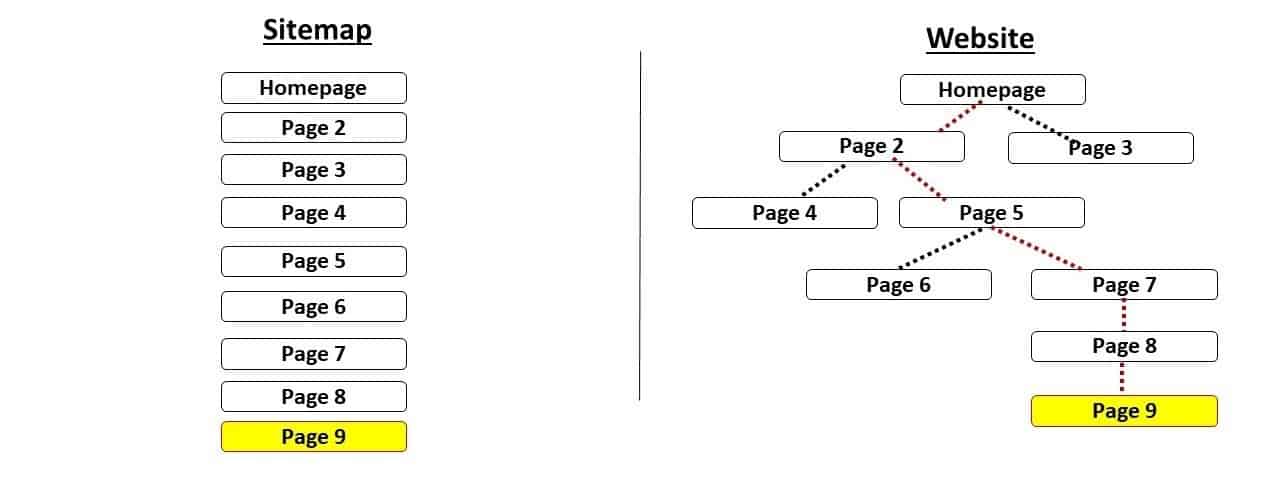
A sitemap is a file that lists the important pages of your website so search engines like Google and Bing can find and crawl them faster. Most sitemaps are XML files placed at a URL like yourwebsite.com/sitemap.xml. Think of it as a guest list you hand to a search engine: it shows which pages you want seen and when they last changed.

Why it exists

Search engines find pages mainly by following links. That works fine when your internal linking is strong. It breaks down when a page has no links pointing to it (an orphan page), when your site is new with no backlinks, or when your site is so large that the crawler doesn't reach every page. A sitemap gives Googlebot a direct route to those pages.

Main types of sitemaps

  • XML sitemap: built for search engine crawlers, and the one most sites need

  • HTML sitemap: a visible page for human visitors, useful on large sites

  • Image and video sitemaps: give extra detail about media files

  • News sitemap: helps publishers get recent articles into Google News

What's inside an XML sitemap

Each page sits in a <url> entry with a <loc> tag (the full URL, required) and an optional <lastmod> tag (the date of the last meaningful update). Google has said it ignores the <priority> and <changefreq> tags, so accurate URLs and honest lastmod dates are where your effort should go.

Does a sitemap help you rank?

Not directly. A sitemap helps discovery and crawling, while ranking depends on content quality, relevance, and backlinks. The benefit is indirect but real: a page Google never finds can't rank at all, and a sitemap gets the right pages found sooner.

Do you need one?

Google says a small site with solid internal linking may do fine without it. Still, a sitemap costs almost nothing to add, so I'd include one on nearly every site. It matters most if your site has hundreds of pages, publishes often, runs an online store, or is brand new.

How to create and submit one

  1. Generate it with your CMS or a plugin. Yoast SEO, Rank Math, and WordPress's built-in feature all do this, and Shopify, Wix, and Squarespace create one automatically.

  2. Open Google Search Console and go to Indexing → Sitemaps.

  3. Enter your sitemap URL and click Submit.

  4. Optionally add Sitemap: https://yourwebsite.com/sitemap.xml to your robots.txt file, since crawlers read that file first.

Best practices

  • Include only indexable pages that return a 200 status code

  • Remove redirects, 404s, noindex pages, and duplicate URLs

  • Stay under the limit of 50,000 URLs or 50 MB per file, and use a sitemap index file for bigger sites

  • Keep lastmod dates truthful, because Google learns to ignore the field if every page shows today's date

Bharti Mehra
Digital Markting Content
View Profile

I am curious and creative soul who loves learning, exploring new ideas, and sharing meaningful thoughts. With a warm personality and a positive outlook, she believes in growing a little every day, embracing new experiences, and inspiring others along the way.

0
Replying to the question above
Answered on06/23/26

If you've ever built a website, chances are you've come across the word "sitemap." The first time I heard it, I honestly thought it was some kind of visual map showing where every page of a website was located. Later, I realized it's much more important than that.

A sitemap is basically a file that tells search engines like Google which pages exist on your website and which ones you want them to crawl and index. You can think of it as giving Google a roadmap of your website.

Now imagine you've just published a brand-new blog post.

If Google doesn't know that page exists, it may take longer to discover it naturally through links. However, if your sitemap includes that page, you're essentially saying:

"Hey Google, I've published something new. You can crawl this page."

That's why almost every SEO professional recommends having an XML sitemap, especially for growing websites.

Why Is a Sitemap Important?

A sitemap makes it easier for search engines to understand your website.

Some of its biggest benefits include:

  • Helps Google discover new pages faster.

  • Improves crawling efficiency.

  • Makes sure important pages aren't overlooked.

  • Useful for large websites with hundreds or thousands of pages.

  • Supports better indexing of updated content.

It's important to remember that a sitemap doesn't directly improve rankings. Instead, it helps search engines find and understand your content more efficiently. Better crawling can eventually support your overall SEO strategy.

Imagine your website is a huge shopping mall.

Without a sitemap, Google has to walk around every floor hoping it finds every shop.

With a sitemap, you hand Google a complete directory showing exactly where every shop is located. That makes the crawling process much quicker and more efficient.

Types of Sitemaps

There are two main types:

XML Sitemap

This is created mainly for search engines. It lists all the important URLs that should be crawled and indexed.

HTML Sitemap

This is created for visitors. It displays a structured list of pages so users can navigate the website more easily.

Best Practices

If you're creating a sitemap, keep these points in mind:

  • Include only important, indexable pages.

  • Remove broken or redirected URLs.

  • Update it whenever you publish new content.

  • Submit it through Google Search Console.

  • Make sure your sitemap is error-free.

Sitemap at a Glance

FeatureDetails
PurposeHelp search engines discover website pages
Used ByGoogle, Bing, and other search engines
Most Common FormatXML Sitemap
Direct Ranking Factor?No
Helps WithCrawling and indexing

Must Read: Explain Spiders, Robots, and Crawlers

Tara Verma
Explaining SEO concepts in simple language with practical examples
View Profile

Tara Verma is a practising teacher and education content writer with over 10 years of classroom experience across primary and secondary levels. She holds a Master's degree in Education (M.Ed.) from Delhi University and a Bachelor of Education (B.Ed.) from Jamia Millia Islamia — qualifications that ground her writing in both pedagogical theory and the day-to-day realities of teaching in India. Her content covers exam preparation strategies, learning methodologies, curriculum guidance, student mental health, career counselling for students, and the evolving state of school and higher education in India. Her work has appeared on platforms including TeacherVision India, Jagran Josh, and Careers360, where she writes for students, parents, and fellow educators who need content built on actual teaching experience — not theory alone. Over a decade of working directly with students across age groups and learning levels has given Tara a practical understanding of how education content should be written — clearly, accessibly, and with genuine awareness of the challenges students and teachers face on the ground. She has taught 1,000+ students, contributed to school curriculum development initiatives, and published 250+ articles on education across digital platforms. She is an active member of the National Council of Teachers of English (NCTE) India. Across all her writing, every recommendation is classroom-tested, every insight comes from direct teaching experience, and every article is held to the same standard she applies in her own classroom — accuracy, clarity, and genuine usefulness for the reader.

0
Replying to the question above
Updated on09/22/26

A sitemap in SEO is a file that lists all the important pages on a website, along with their relationships to each other. Sitemaps help search engines like Google crawl and index websites more efficiently.

Sitemaps are typically created in XML format, and they can be submitted to Google Search Console so that Google can be aware of them.


Benefits of using a sitemap for SEO:

  • Sitemaps can help search engines discover new and updated pages on a website more quickly.

  • Sitemaps can help search engines understand the structure of a website and the relationships between its pages.

  • Sitemaps can help search engines prioritize the crawling and indexing of important pages on a website.

  • Sitemaps can help search engines identify and fix crawl errors.


How to create a sitemap:

There are a number of ways to create a sitemap, but the most common method is to use a sitemap generator plugin or tool. Once a sitemap has been created, it can be submitted to Google Search Console.


Letsdiskuss


Also Read- What is technical SEO?


K
View Profile
1
Replying to the question above
Answered on12/03/24

A sitemap is a blueprint of your website that helps search engines find, crawl, and index all of your website’s content. Sitemaps also tell search engines which pages on your site are most important.


There are four main types of sitemaps:

  • Normal XML Sitemap: This is by far the most common type of sitemap. It’s usually in the form of an XML Sitemap that links to different pages on your website.
  • Video Sitemap: Used specifically to help Google understand video content on your page.
  • News Sitemap: Helps Google find content on sites that are approved for Google News.
  • Image Sitemap: Helps Google find all of the images hosted on your site.


Why are Sitemaps Important?

Search engines like Google, Yahoo, and Bing use your sitemap to find different pages on your site.

Sitemaps can help search engines find pages


As Google puts it:

“If your site’s pages are properly linked, our web crawlers can usually discover most of your site.”


In other words: you probably don’t NEED a sitemap. But it definitely won’t hurt your SEO efforts. So it makes sense to use them.

There are also a few special cases where a sitemap really comes in handy.


For example, Google largely finds webpages through links. And if your site is brand new and only has a handful external backlinks, then a sitemap is HUGE for helping Google find pages on your site.


Or maybe you run an e-commerce site with 5 million pages. Unless you internal link PERFECTLY and have a ton of external links, Google’s going to have a tough time finding all of those pages. That’s where sitemaps come in.


With that, here’s how to set up a sitemap…and optimize it for SEO.


J
Author
View Profile
0
Updated on07/15/26

If this question was asked 5 years ago, I would say there is nothing known as digital marketing, but today, there are thousands of companies generating tonnes of revenue only with digital marketing. So there is tremendous scope provided you learn it form a good institute and also learning SEO will be an added advantage.

Letsdiskuss

N
View Profile

love interacting with students and also love to help people in seeking path ahead.

0
0
Replying to the question above
Answered on10/11/23

In SEO, a sitemap is a file or page that provides a structured and organized list of all the web pages and content on a website. It serves as a roadmap for search engine crawlers to navigate and index the site more efficiently. Sitemaps can be in XML or HTML format, and they help search engines understand the website's structure and hierarchy, ensuring that all pages are crawled and indexed. This improves a site's visibility in search engine results and enhances SEO by making it easier for search engines to discover and rank your content.


Becanvas Creatives

Becanvas is the best creative marketing agency

0
Replying to the question above
Answered on10/11/23

In the realm of digital marketing, an indispensable tool is the "sitemap." This invaluable file plays a pivotal role in enhancing a website's visibility and comprehension by search engines, notably the almighty Google.

Sitemaps come in two flavors:


1. XML Sitemap: Crafted with meticulous care for the discerning eyes of search engines, the XML sitemap is a structured directory of a website's URLs. What sets it apart is its ability to furnish additional data about each URL, including its last update. This feature empowers search engines to traverse and index a website with unparalleled efficiency.


2. HTML Sitemap: Tailored to cater to the human audience, the HTML sitemap takes the form of a webpage on the site. This user-friendly page offers a neatly organized roster of links to various web pages, simplifying navigation for visitors.


In the digital marketing playbook, possessing an XML sitemap is akin to an SEO home run. It guarantees that search engines can uncover and index all the vital pages on your website, ultimately boosting your site's prominence in search results. It's a winning strategy to improve your online visibility and overall SEO performance.


Letsdiskuss


M
Author
View Profile
0
Replying to the question above
Updated on09/22/26

A sitemap is a pivotal part of site improvement (Web optimization) that assumes a huge part in further developing site perceivability and rankings on web search tool result pages (SERPs). In this article, we will investigate what a sitemap is, its significance in Web optimization, how to make one, and best practices for improving it.

In straightforward terms, a sitemap is a record that rundowns every one of the pages on a site, permitting web search tools to effectively creep and list them more. It gives web crawler bots a guide of your site's design and content pecking order. Ordinarily, sitemaps are written in XML design, albeit different arrangements, for example, HTML are likewise utilized.

The main role of a sitemap is to assist with looking through motors find and figure out the substance on your site. By giving an exhaustive rundown of URLs, it guarantees that web search tools can without much of a stretch access and record every one of the important pages. This is especially valuable for sites with complex designs, dynamic substance, or pages that are not all around connected inside.

Here are a few key justifications for why sitemaps are significant for Website optimization:

1. Further developed slithering and ordering: Web crawler bots use sitemaps to explore through sites, it are found and listed to guarantee that all pages. By presenting a sitemap to web search tools like Google, you can accelerate the creeping system and increment the possibilities of your pages being filed.

2. Improved perceivability: When web crawlers have a reasonable comprehension of your site's design and content, they can show more precise and important outcomes to clients. This can prompt better perceivability and higher rankings on SERPs.

3. Indexation of non-connected pages: A few pages on your site may not be quickly open through interior connections. These could incorporate pages with restricted or no outer connections, powerfully produced content, or new pages that haven't been found at this point. A sitemap guarantees that such pages are as yet crept and filed via web indexes.

4. Need and newness pointers: Sitemaps permit website admins to give extra data about their pages, for example, need and last alteration date. This assists web search tools with figuring out the significance and recency of each page, affecting their creeping and ordering choices.

Now that we comprehend the significance of sitemaps, how about we investigate how to make one:

1. Begin with a sitemap generator: There are different instruments accessible that can naturally create sitemaps for your site. These devices slither your site, recognize every one of the pages, and make a sitemap record in the ideal configuration (e.g., XML). Some famous sitemap generators incorporate Shouting Frog, Yoast Web optimization module for WordPress.

2. Structure your sitemap: A very much organized sitemap is fundamental for both web crawlers and clients. It ought to mirror your site's order and obviously characterize the connections between various pages. Coordinate your URLs into intelligent classifications and subcategories, making it simpler for web crawlers to grasp the substance stream.

3. Incorporate every single pertinent page: Guarantee that your sitemap remembers every one of the significant pages for your site. This incorporates static pages as well as blog entries, item pages, class pages, and some other substance you maintain that web search tools should record.

4. Improve for crawlability: To boost the adequacy of your sitemap, think about the accompanying prescribed procedures:

- Keep the sitemap record size under 50MB and 50,000 URLs. In the event that your site surpasses these cutoff points, make various sitemap documents or utilize a sitemap list record.

- Utilize appropriate URL designs (e.g., authoritative URLs) to stay away from copy content issues.

- Remember just sanctioned URLs for your sitemap to forestall ordering of copy or inferior quality pages.

- Consistently update your sitemap to ponder changes your site. This should be possible physically or by utilizing mechanized devices that update the sitemap at whatever point new satisfied is added.

Letsdiskuss

Mohd  Sameer
View Profile
0
Replying to the question above
Answered on10/10/23

A sitemap is a blueprint of your website that helps the crawler crawl and index all of your website's content. There are two types of sitemaps: HTML and XML. HTML sitemaps guide visitors or users. While XML sitemaps guide search engine bots, to ensure they find a site's URLs to index. A good XML sitemap acts as a roadmap of your website that leads Google to all your important pages. XML sitemaps play a crucial role in SEO by enabling Google to swiftly locate and index your vital web pages

How to create Sitemap:


  1. Gather all of your site's URLs.
  2. Code the URLs.
  3. Use the Sitemap generator tool to generate Sitemap.
  4. Access Google Search Console and select "Sitemaps" from the left sidebar.
  5. Insert the URL of your sitemap in the designated section labeled "Add a new sitemap" at the top of the page.
  6. Click submit and Google will crawl your newly created XML sitemap.


Neha goyal
View Profile
0
Answered on06/06/24

Businesses in the current virtual technology depend upon their online exposure to attract and hold customers. As a result, there is a developing want for professionals in virtual advertising, particularly in Search Engine Optimization (SEO). It might be a sensible decision to pay attention to search engine optimization in case you need to launch a successful career in virtual marketing. This put-up will educate you on the basics of SEO for virtual advertising and a way to begin your search engine marketing career even if you have no prior knowledge.


Letsdiskuss


What is SEO?

Optimizing websites to rank higher on search engine effects pages is known as search engine optimization, or search engine optimization (SERPs). This boosts the internet site's natural (unfastened) visitors. You'll paint on quite a few tasks as a search engine optimization expert, which include link constructing, on-page optimization, keyword research, and performance metrics evaluation.

Search engine marketing Jobs and Opportunities

As more agencies apprehend how essential it is to rank nicely in search outcomes, there may be an increasing need for search engine marketing expertise. Search engine marketing jobs can vary in level, from coordinators or assistants to managers or administrators, which can be more senior positions. Furthermore, a stable draw close of search engine optimization is increasingly vital for lots of virtual advertising and marketing positions, making it an essential talent in the advertising and marketing sector.


How can I get started career in digital marketing , In terms Of SEO


Getting Started with SEO: A Step-with the aid of-Step Guide


Step 1: Study the Foundations of SEO

It's important to have a solid foundation in search engine marketing earlier than getting into the employment market. There are a lot of assets available to assist you in gaining knowledge of SEO:


  • Search engine marketing for Novices: Begin with online training and tips for novices. Comprehensive instructions are available on websites like as Ahrefs, Moz, and Search Engine Journal.

  • Take one of the pinnacle SEO guides for beginners by way of enrolling. Sites with organized getting-to-know pathways include LinkedIn Learning, Udemy, and Coursera.

  • Obtaining a certification in search engine marketing might assist you turn out to be more credible. Search online without spending a dime on search engine marketing certification packages supplied by using decent groups like HubSpot Academy and Google Analytics Academy.


Step 2: Acquire Real-World Experience

  • Build Your Website or Blog: This helps you to place the entirety you've found out into practice and see how SEO functions in actual time.

  • Offer your SEO competencies to buddies, relatives, or small corporations as a volunteer or freelancer. By doing this, you enhance each of your revel in and portfolio.

  • Search for entry-level jobs or internships that concentrate on search engine optimization or digital marketing. These positions offer possibilities for mentorship and practical enjoyment.


Step 3: Keep abreast of market trends

  • Read sites that include Moz, Search Engine Land, and Neil Patel's blog on a regular foundation. Participate in SEO boards and blogs. Engage in discussions on places such as Google's Webmaster Central and the SEO community on Reddit.

  • Attend Webinars and Conferences: To community with specialists and get know-how about present-day improvements, participate in enterprise webinars and search engine marketing conferences.

  • Join Professional Communities: Participate in Facebook or LinkedIn organizations devoted to digital advertising and SEO to community with like-minded people.


Step 4: Acquire Essential search engine optimization Skills

  • Technical SEO: Recognize how crawlability, indexing, and internet site architecture impact SEO. Find out about HTTPS, robots.Txt, and XML sitemaps.

  • Use tools together with Ahrefs, SEMrush, and Google Keyword Planner to do keyword research and find relevant phrases in your content.

  • On-Page Optimization: To seek engine publicity, learn how to optimize headers, content material, and meta tags.

  • Link constructing: Create plans for buying legit websites to hyperlink on your great backlinks.

  • Analytics and Reporting: To display consequences and extract insights, get gifted with tools which include Google Analytics and Google Search Console.


Step 5: Look for Jobs in search engine marketing

  • Search for positions with names along with "search engine optimization professional," "SEO analyst," or "search engine optimization representative."

  • Jobs in Digital Marketing: search engine marketing know-how is vital for many jobs in digital advertising. Search engine optimization duties are regularly protected in positions with titles like online advertising coordinator or digital advertising professional.

  • Freelance and Remote Work: For flexible search engine marketing employment options, have an examination of freelance job networks like We Work Remotely and structures like Upwork or Fiverr.


Step 6: Be Interview Ready

  • Case Studies: Prepare a brief assessment of any websites or tasks you have labored on, emphasizing the difficulties and consequences.

  • Technical Questions: Be prepared with inquiries approximately the most modern developments, tools, and techniques in search engine optimization. Practice expressing complex thoughts in sincere language.

  • Problem-Solving Scenarios: To gauge your analytical and strategic thinking, you'll be presented with fictitious situations.


How can I get started career in digital marketing , In terms Of SEO


How Much Do Search Engine Marketing Specialists Make?

Salary ranges for search engine marketing professionals depend on elements along with company size, geography, and revel in. Based totally on modern-day statistics:


  • Search engine optimization professionals in their entry-level positions frequently make between $40,000 and $60,000 annually.

  • Mid-level search engine marketing Experts: Their annual revenue levels are from $60,000 to $90,000.

  • Senior SEO Managers and Experts: Annual salary degrees from $90,000 to $150,000.


In addition to income-rewarding quotes, freelance search engine marketing specialists regularly pay hourly or venture-based fees.


J
Curriculum Specialist
View Profile

Joel Tucker is a curriculum specialist and education content writer with over 8 years of experience designing, developing, and evaluating learning programmes across K-12 and higher education settings. He holds a Master of Education (M.Ed.) in Curriculum and Instruction from the University of Melbourne and a Bachelor of Arts in Education from the University of Sydney — qualifications that combine deep pedagogical theory with the practical demands of curriculum design in real educational environments. His content covers curriculum development, instructional design, learning assessment frameworks, education policy, ed-tech integration, teacher professional development, and evidence-based teaching methodologies. His work has appeared on platforms including Edutopia, Education Week, and The Conversation Education, where he writes for educators, school leaders, and policymakers who need content built on genuine curriculum expertise — not generic teaching advice recycled from other sources. Over eight years, Joel has designed curriculum frameworks for schools and educational institutions across Australia and internationally, working with bodies including the Australian Curriculum Assessment and Reporting Authority (ACARA). He has published 220+ articles on education, presented at the Australian Council for Educational Research (ACER) Conference, and is a certified member of the Australian College of Educators (ACE). Across all his writing, every instructional recommendation is grounded in current educational research, every curriculum insight reflects direct design experience, and every article is held to the standard that serious education professionals expect — evidence first, clarity always.

5
2
Replying to the question above
Answered on10/09/23

In the realm of SEO (Search Engine Optimization), a Sitemap is a structured list or map that provides information to search engines about the content and organization of a website. Essentially, it serves as a blueprint, aiding search engine crawlers in navigating and comprehending the structure of a site. This XML-based file includes URLs, metadata, and other relevant details about each page on the website.


A Sitemap offers several advantages for SEO. Firstly, it ensures that all the important pages of a website are indexed by search engines, enhancing the visibility of the site in search results. It's particularly beneficial for large websites or those with complex structures, where some pages might be challenging for search engines to discover through regular crawling.


Additionally, a Sitemap provides an opportunity to communicate the priority and frequency of updates for different pages, helping search engines prioritize their crawling efforts. This is crucial for dynamic websites with frequently changing content.


Letsdiskuss


Pandey Chandan
View Profile

I am a content writer & SEO Expert.

0