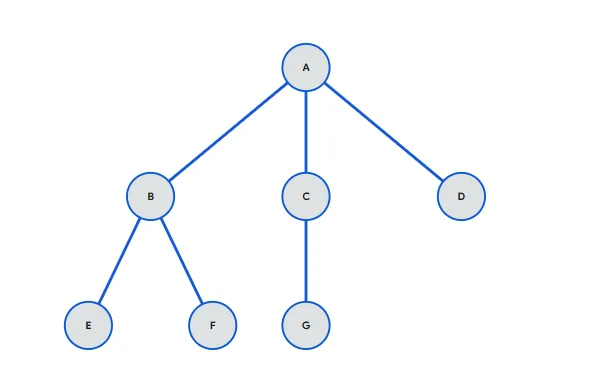
Converting a general tree (where a node can have any number of children) into a binary tree is commonly done using the Left-Child Right-Sibling (LCRS) method. This technique allows us to represent any general tree using a binary tree structure without losing relationships between nodes.
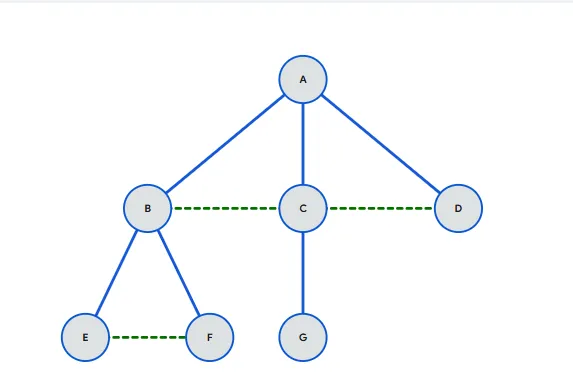
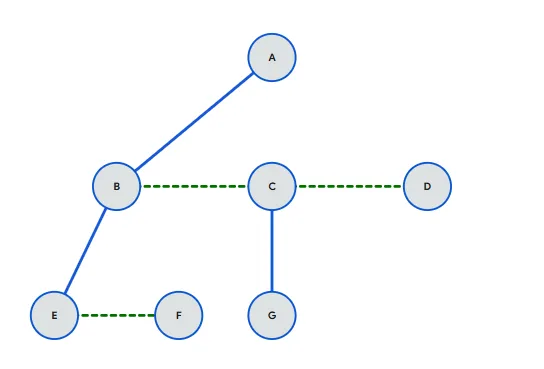
The main idea is simple. In a binary tree, each node can have at most two children, so we adjust how children are connected. First, we keep the first child of every node as its left child in the binary tree. Then, instead of linking all remaining children directly, we connect them using right pointers as siblings. In other words, the second child becomes the right child of the first child, the third child becomes the right child of the second child, and so on.
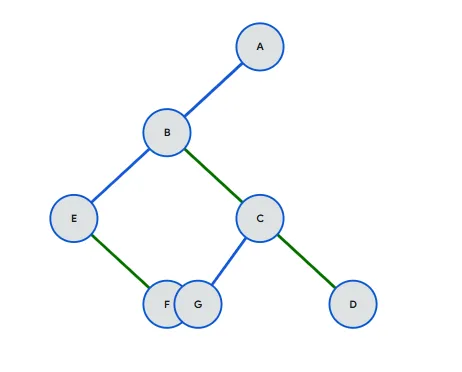
To perform the conversion, start with the root of the general tree. Assign its first child as the left child in the binary tree. Then take the remaining children and connect them one by one through the right pointer, forming a chain of siblings. After that, repeat the same process recursively for each child node.
This method preserves the hierarchy of the original tree. The parent-child relationship is maintained through the left pointer, while the sibling relationship is maintained through the right pointer. Because of this, we can still traverse and interpret the structure correctly even after conversion.
One major advantage of this approach is that it uses less memory compared to storing multiple child pointers. It also makes it easier to apply binary tree algorithms on general trees.
In short, the Left-Child Right-Sibling representation is an efficient and practical way to convert a general tree into a binary tree while keeping the structure intact.