
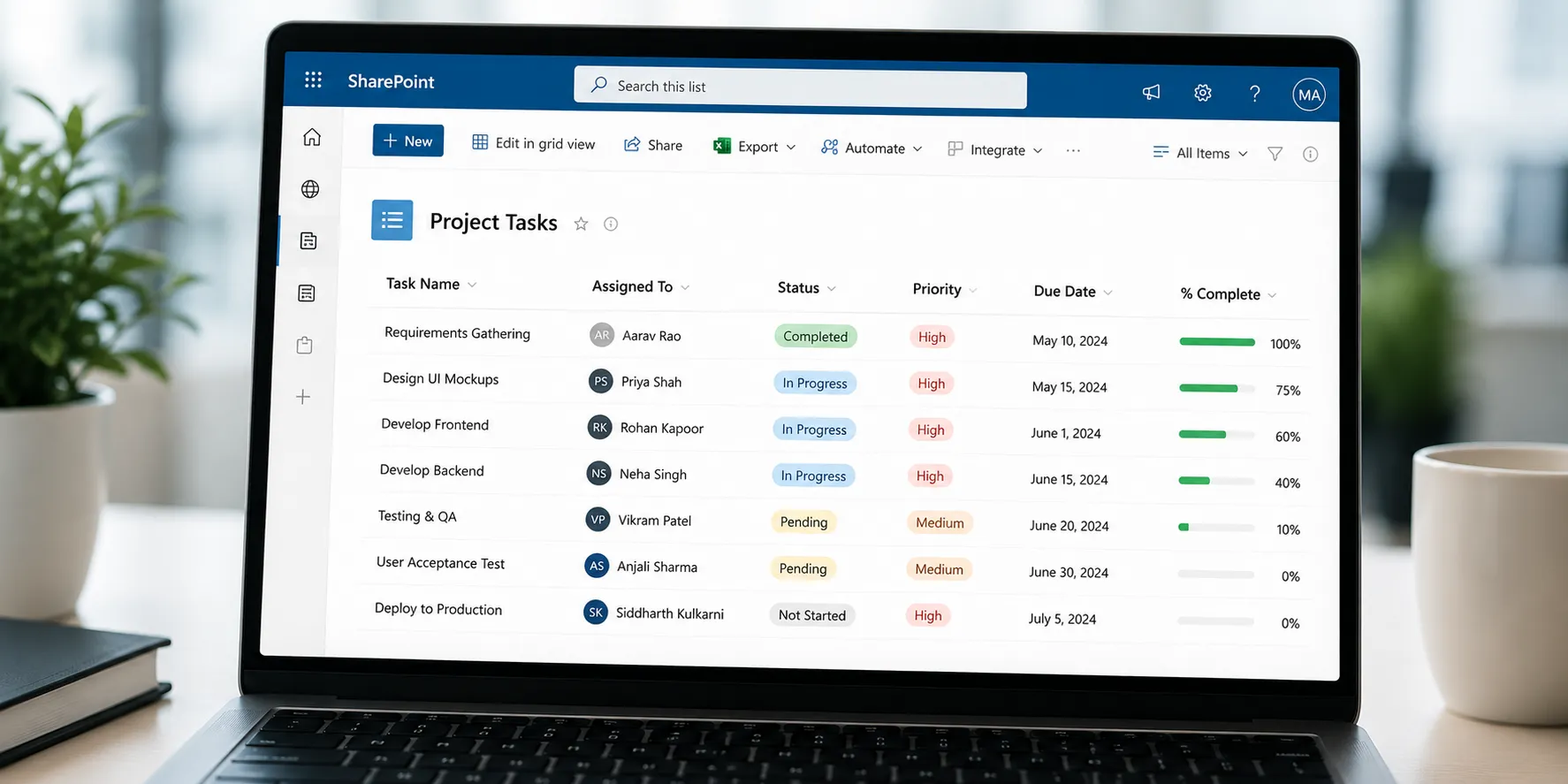
A SharePoint List is a structured collection of information stored within Microsoft SharePoint that helps individuals and teams organize, track, and manage data. It works similarly to a spreadsheet, with rows representing individual records (items) and columns representing different types of information (fields). However, unlike a traditional spreadsheet, a SharePoint List supports collaboration, version history, permissions, automation, notifications, and integration with other Microsoft 365 applications.
Organizations commonly use SharePoint Lists to manage tasks, employee information, project trackers, issue logs, inventories, customer records, assets, and business processes. Since multiple users can access and update the same list simultaneously, SharePoint Lists have become an essential tool for collaboration and data management within Microsoft 365.
How It Works
A SharePoint List stores information in a structured format that users can easily view, update, filter, sort, and share.
The basic workflow typically looks like this:
-
Create a List – Build a blank list, import data, or use a built-in template.
-
Define Columns – Add fields such as text, numbers, dates, choices, people, attachments, or hyperlinks.
-
Add Items – Each row (item) stores one record of information.
-
Collaborate – Team members can view, edit, or update items based on their permissions.
-
Automate Processes – Lists can connect with Microsoft Power Automate to send notifications, approvals, reminders, or trigger workflows automatically.
-
Analyze Data – Users can sort, filter, group, or create customized views to quickly find relevant information.
Unlike spreadsheets that are primarily designed for calculations, SharePoint Lists are optimized for collaborative data management and business workflows.
Common Uses
SharePoint Lists are used across many industries and departments.
| Use | Example |
|---|---|
| Task Management | Track project tasks and deadlines |
| Employee Directory | Store employee contact information |
| Asset Management | Monitor laptops, equipment, and company assets |
| Issue Tracking | Record and manage reported problems |
| Inventory Management | Track stock levels and supplies |
| Customer Information | Maintain client records and interactions |
| Project Management | Monitor project milestones and progress |
| Event Planning | Organize meetings, registrations, and schedules |
Because they integrate with Microsoft Teams, Power Apps, Outlook, and Power Automate, SharePoint Lists are widely used for day-to-day business operations.
Key Features
SharePoint Lists offer several features that go beyond a traditional spreadsheet.
-
Custom columns with multiple data types
-
Multiple list views (Grid, Calendar, Gallery, etc.)
-
Sorting, filtering, and grouping
-
Item-level permissions
-
Version history
-
File attachments
-
Built-in notifications and alerts
-
Integration with Microsoft Teams
-
Automation through Power Automate
-
Custom forms using Microsoft Power Apps
-
Real-time collaboration
-
Search functionality
These features make SharePoint Lists suitable for both simple record-keeping and complex business processes.
Similar Tools
Although SharePoint Lists resemble other data management tools, they serve a different purpose.
| Tool | Best Used For |
|---|---|
| SharePoint List | Collaborative business data management and workflow tracking |
| Microsoft Excel | Calculations, formulas, financial analysis, and reporting |
| Microsoft Lists | Modern interface for creating and managing SharePoint Lists across Microsoft 365 |
| Microsoft Access | Desktop database applications with advanced relational databases |
| Google Sheets | Collaborative spreadsheets and data calculations |
A SharePoint List is often the better choice when multiple users need to manage structured information with permissions, automation, and version control, whereas Excel is better suited for numerical analysis and complex calculations.
Benefits
Using SharePoint Lists offers several advantages.
-
Centralizes business information in one location.
-
Allows multiple users to collaborate simultaneously.
-
Improves data consistency across teams.
-
Supports automated workflows and approvals.
-
Reduces manual data entry through integrations.
-
Provides customizable views for different users.
-
Includes built-in security and permission management.
-
Maintains version history for tracking changes.
-
Integrates seamlessly with Microsoft 365 applications.
These capabilities help organizations improve productivity, collaboration, and process efficiency.
Limitations
Although SharePoint Lists are powerful, they have certain limitations.
-
Not designed to replace large relational databases.
-
Extremely large lists may require performance optimization.
-
Advanced customization may require Power Apps or SharePoint development skills.
-
Users unfamiliar with Microsoft 365 may experience a learning curve.
-
Complex reporting often requires Power BI or Excel integration.
For highly complex enterprise databases, organizations may choose solutions such as Microsoft SQL Server instead of relying solely on SharePoint Lists.
Common Misconceptions
"A SharePoint List is just an Excel spreadsheet."
No.
Although both display data in rows and columns, SharePoint Lists support collaboration, permissions, workflows, version history, automation, and Microsoft 365 integration, making them much more than spreadsheets.
"Only IT departments use SharePoint Lists."
Not true.
HR, Finance, Sales, Marketing, Operations, Customer Support, Education, Healthcare, and many other departments use SharePoint Lists for everyday business processes.
"SharePoint Lists require programming."
No.
Most SharePoint Lists can be created and managed through a user-friendly interface without writing code. Advanced customization is optional.
"SharePoint Lists can only store text."
Incorrect.
They support multiple column types, including numbers, dates, people, attachments, images, hyperlinks, choice fields, lookup columns, and more.
Frequently Asked Questions (FAQs)
1. What is a SharePoint List?
A SharePoint List is a structured collection of data within Microsoft SharePoint used to organize, track, and manage information collaboratively.
2. Is a SharePoint List the same as Excel?
No.
Excel is primarily designed for calculations and data analysis, while SharePoint Lists are built for collaborative data management, workflow automation, and business processes.
3. What can a SharePoint List be used for?
It can be used for task tracking, inventory management, employee directories, customer records, issue tracking, project management, event planning, and many other business applications.
4. Can multiple people edit a SharePoint List at the same time?
Yes.
Users with appropriate permissions can simultaneously add, edit, and update items, making SharePoint Lists ideal for team collaboration.
5. Does a SharePoint List work with other Microsoft 365 apps?
Yes.
SharePoint Lists integrate with Microsoft Teams, Power Automate, Power Apps, Outlook, Power BI, and other Microsoft 365 services to streamline collaboration and automate workflows.
A SharePoint List is a powerful Microsoft 365 feature that helps organizations store, organize, and manage structured information in a collaborative environment. While it resembles a spreadsheet, it offers far more capabilities, including permissions, version history, workflow automation, custom views, and seamless integration with other Microsoft tools. Whether you're tracking projects, managing inventory, maintaining employee records, or streamlining business processes, SharePoint Lists provide a flexible and scalable solution for organizing data and improving team productivity.
Must Read: Why do we use ms Excel?